Showing posts with label photo software. Show all posts

12/19/2014

Sepia photos..a few tips

 
Many times  you are going to be using photos that you might want to convert to sepia tones... Most photo editing programs allow you to do that. 

First you don't need to rush out and buy Photo Express or some expensive program...  I always recommend Picasa.  It is Google's photo program and it is free to download and does just amazing things...  Last summer they changed the icons which I thought was a mistake but it is still the best around for free..

But you may have  something already on your computer that you are not even aware of.... a program that came with your printer or camera.  You can easily find out.  Go to your picture file and RIGHT CLICK  on any picture and a little menu will pop up and one choice is OPEN WITH.  When you click on that it will tell you your options... You will probably have a basic program with your word program along with others.  It turns out one of my favorite is the photo editing program that came with my HP printer and I had it for years before I accidentally discovered it. It is simple and easy to use... So take some time to experiment with what already you have...

Even though they do a lot of the same things, they often have different terminology for the same action... Most have a tools for adjusting the overall color in a photo.... Some refer to saturation, others refer to  color temperature and Google calls theirs "warmify" (weird). I like the ones with a little bar you can adjust and see the change as you do it..  Both my printer program and Picasa have that feature... Sometimes converting a photo will be listed under "special effects"

Most often the photos you want to convert are black and white and they are easily converted..  I do NOT recommend converting colored photos directly to sepia without an intermediate step.  Convert them to black and white first..

For some reason the color in the photo affects the results of the sepia.. It's not all that obvious but if you are doing a series, it makes a big difference.


Here  I first changed the colored image to black and white and then to sepia. As a rule the colors in a photograph greatly affect the sepia tomes when you convert it.


When I put the one I changed directly  from color next to the one I changed from black and white you can see the difference.  The one on the right is B&W to sepia... look at the difference in the background and type... It is softer, smoother and the sepia tones are much more pleasant.  For one photo you may not care but if you are working with a series of photos, it makes a big difference.


Even if the  photo you want to use is already a sepia, it may be darker (or lighter)  than you want... Photo editing programs usually have a control for "saturation" and it will usually be a little bar that you adjust either darker or lighter.  I wanted this photograph to be lighter to go with the one above.


Most programs allow you to adjust the temperature as well... With sepia prints, the warmer the tones the older they look... Here you can see the effect of adjusting the temperature.  It is what Goggle calls "warmify".

This is not complex photo editing.  Once you find the tool it is quite easy....The first step is familiarizing yourself with what's on your computer.. and remember Picasa is FREE and free is good.


11/17/2012

4 blocks, 1 bag and a sore foot!


In preparation of our road trip over Thanksgiving I'll have all the last 4 four blocks ready for the final fancy stitching..  There'll be plenty of time to stitch in the car and in the hotel...  Lately I have been dreaming of various ways to assemble the book . decisions!!

On this "Morris and Me" page I made tiny prairie points with some 3/8" plaid ribbon to frame the picture... I thought a pattern would emerge from the plaid... it didn't... But I know how to do it now but 3/4" ribbon or larger would work much better..


The image on the back cover (upper left)  is quite large so there's very little left to do on it...I scored when I found that giant yellow button in my stash.. It will have a special center.

 The skunk trap page is ready for fancy seams.  I'm trying to stick to black and white on that page with the exception of the rainbow.

The block bottom forefront is the "pocket" page in progress.  There will be a narrative for each page on a laminated card  and they will be in this pocket page.  I have an image ready to put on it... I'm also starting another fancy ribbon trim from my ribbon book.  There are so many interesting ways to fold ribbon... I want to try them all.  Now that the end is in sight I want to be done, done, done....

This pile of stuff is going to be a tote for my display blocks which I now carry around in a very large beach bag which is about as ugly as you can possibly imagine.... but...the perfect size.. So since I will be toting the blocks out and about more when the classes start (yes, classes are going to start in January...more later)  I would be embarrassed by the beach bag for my beautiful blocks.

This will be just fancied up tapestry because I need it quick...  I can do the hand work while I am soaking my foot.  About 3 weeks ago I dropped a frozen leg of lamb on my foot... big bruise on foot and a black toenail but now the toe has developed an infection and I'm supposed to be soaking it... as good an excuse for extra stitching as I can think of.

10/22/2012

Have I mentioned I love photo editing.....

While I'm working on the November block for CQJP, I'm also looking forward to the Dec. block  on which I want  an image of Morris and me..  I have dozens of pictures of  DH and Morris but none I would want to use of Morris and myself.. Since DH has a propensity to cut off heads when he uses a camera I enlisted the help of a friend who came to dinner yesterday...

He took about a dozen pictures and in almost all of them Morris was moving his head.  I only found two of me that I wanted to think about using.. I loved this one of Morris so I moved him into one of the pictures I liked of myself.


I also moved Morris into the other picture of myself which I liked...the one on the left but the photographer had cut off the top of my head in this shot.  So I took the top of my head from another shot and added it on the right and cleaned up the background a bit...


Since Morris is handsome in both pictures, the final decision  will come down to me with "teeth showing or no teeth showing".  I prefer the one on the left but DH likes the one on the right. I've plenty of time to think about it as Nov. block is going slowly.

I hate to admit that DH might be right but at the moment the comments (+ emails)  are me (0) and DH (16)

6/26/2011

Big hats - Big Shadows.


I've been working on these photos of the girls on the bike...The first thing was to simplify the background somewhat and then I wanted to lighten the face of the girl on the left...  Big hats  leave big shadows.  It's not that important in this photo but in larger photos it makes a big difference.

Her face was so dark on the left that when I added the sepia tone her features would disappear..  I did a tutorial once on how to do lighten faces in photoshop but can't find it...  BUT I will repeat the process if anyone is interested.

Ah ha!!! I found it... so if you are interested here is the post

3/14/2011

Mini tut....converting photos to sepia tones

I've accumulated several hundred pictures in my suffragette file.. and now it's time to get serious about printing them on fabric... First I need to do some editing and by far my favorite program for this procedure is Google's Picasa... If you do not have a good editing program or timid about trying software as complex as Photoshop, take my advice and try Picasa

I have and use Image Composer and Photoshop but I still LOVE Google's Picasa because
1. It's free
2. It is soooooooooooo user friendly
3. It is extremely versatile...
4. It is so quick and easy.


As you can see in just these few there is great variation in color in my collection of photos....and I wanted them ALL to be sepia (brown) tones since there will be so many of them on the quilt....
Picasa has an "effects" selection of choices and one of them is "sepia" so my first step was to apply that to all the photos I wanted to use...But even with all of them being sepia there was still more variation in tone than I wanted.
So the next step was to use the "saturation" selection.
Third down on the left....it is a choice I use on all photos, colored or not, which are to be printed on fabric... Color is always lost in that process so intensifying color in the beginning makes for a better end product. But in this case I'm using saturation to put many photos into balance. But as you can see the tools include sharpening, changing to B&W, tinting, adding a glow and soft focus among others... There are many other tools in the basic fixes and tuning sections.
On most of the effects tools there is this simple bar and button.. You can slide the button either way and watch the change in your photo as you use it and before you hit the apply button... VERY low tech here...
So using this simple technique you can see how I was able to make my photos very even in tone... Not only easily but quickly.


Just as a follow up note... To get the pictures of the Picasa tools I actually took a picture of the computer screen as it was something that was not downloadable... I do this quite often but the last time I posted about it I received such a negative response from one follower that I was hesitant to confess again... Hopefully that follower has moved on...if not I already know how you feel on this subject..!!!

2/24/2011

Madison's Photo

Everyone is sleeping this morning including Miss Molly who has moved into Cathy's bed to sleep. I will take a few minutes to show the steps in creating the focal point for my block for the Sharon Boggon workshop.

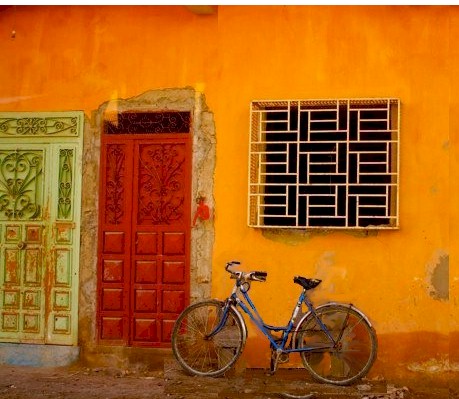
I loved this photo my talented granddaughter took in Morocco in December and wanted to use it on that CQ piece and I'm preparing the block today...

I needed to simplify the photo a bit with a little photo editing. I wanted to crop out the door on the right and I wanted the cement blocks gone... So I made a couple copies of the photos..

On the first copy I edited out the bike all together. But as you can see the little bit of blue of the bike is vital to the composition of the photo .. Also the bike adds the human element of the photo... So I definitely wanted the bike back in the photo but without the cement blocks.


On the second copy I isolated the bike and began erasing the cement blocks... Since the wall and street are so rustic it does not have to be too precise.

Then I dropped the bike back into the photo and still need to do a little fine tuning.


The final step will be to set the photo on a bigger block of orange to create a seam allowance.


11/19/2010

Editing Magic


I know I have mentioned this before but will add it again... I always talk about Photoshop and I do have an older version of photoshop but what I actually use all the time is called "Microsoft Image Composer" (MIC) It's like a kindergarten photoshop and hasn't been sold for years... I keep meaning to use my photoshop more so I get comfortable with it but it's easier and faster to use MIC because I am used to it........ But anything I do with MIC you can do better with photoshop....

Remember in my last post I felt I was going to have a problem with the face on this girl because it was in the shadow of the hat and if I intensified the color to print on fabric it would really too dark? I wanted the face lighter but not the rest of the photo lighter....Well I performed a little editing magic..

I made an extra copy of the photo and edited out just the face. I then lightened it and pasted it on over the original.... You can see what a difference it made when you see the two photos side by side.... When I edit my son's pictures from his fishing lodge I have to do this little trick a lot because the fisherman are often wearing a hat with a big brim and their face is in deep shadow... and of course when they catch "the big one" they want everyone to see their big grin clearly... LOL


6/13/2009

New Header or "I never met a dove I didn't love......."

Well the day is off to a good start and I can cross new header off my list... The pair of doves are from a RR block I did for Maire and the dove with the ribbon is from a RR block I did for Cathy K.

1/08/2009

And now what????? Bridge Tallies???


I was asked what I was going to do with my queens. Well to start I'm going to print two of them on silk and use them on blocks for the Heart RRs.... But last night I realized that they would make GREAT bridge tallies. So I will make up several sets so I have them to use and also to give as prizes and hostess gifts. AND I think they would make precious invitations to a Valentine Tea. I actually think my brain works better with my leg elevated. I wonder if anyone has done a scientific study on this phenomenon.

1/07/2009

Queens for Debbie Q. and Cathy K.


I did the first queen for Debbie in Maine because she especially loves the little girl images and Cathy K sent the image on the left for hers.. These Heart RRs are going to so much fun to watch...

Enough Queens Already


Well I think I'd better move on but I have certainly learned a lot about what to look for in an image, tried new tools in my software and improve my coordination with my mouse and software tools. If anyone is in the hearts RR and wants a queen of hearts let me know. You could send me your image or colors.
Related Posts Plugin for WordPress, Blogger...

Popular Posts